CoughDrop AAC
- 3.9
- Rating
- 50.00K
- Installs
- Free
- Price

 Analysis by App-foxy
When communication depends on an AAC tool, “simple” only matters if the app remains usable during real conversations, rushed mornings, appointments, and moments when the person using it cannot afford extra friction. I spent time looking at CoughDrop AAC from that practical angle. It is a free education app from MavWare, LLC. that turns an Android device into a flexible communication aid, and my overall impression is that its value comes less from flashy presentation than from the ability to shape the experience around an individual communicator.
The app is aimed at people who use augmentative and alternative communication, along with parents, teachers, therapists, and support workers who help build a reliable communication routine. It is rated for Everyone, so the presentation is approachable, but that does not mean every setup will be effortless. AAC works best when the vocabulary, layout, access method, and daily habits fit the person using it. CoughDrop gives you room to make those choices, yet that flexibility also means someone has to spend time preparing the system.
How CoughDrop AAC works in everyday communication
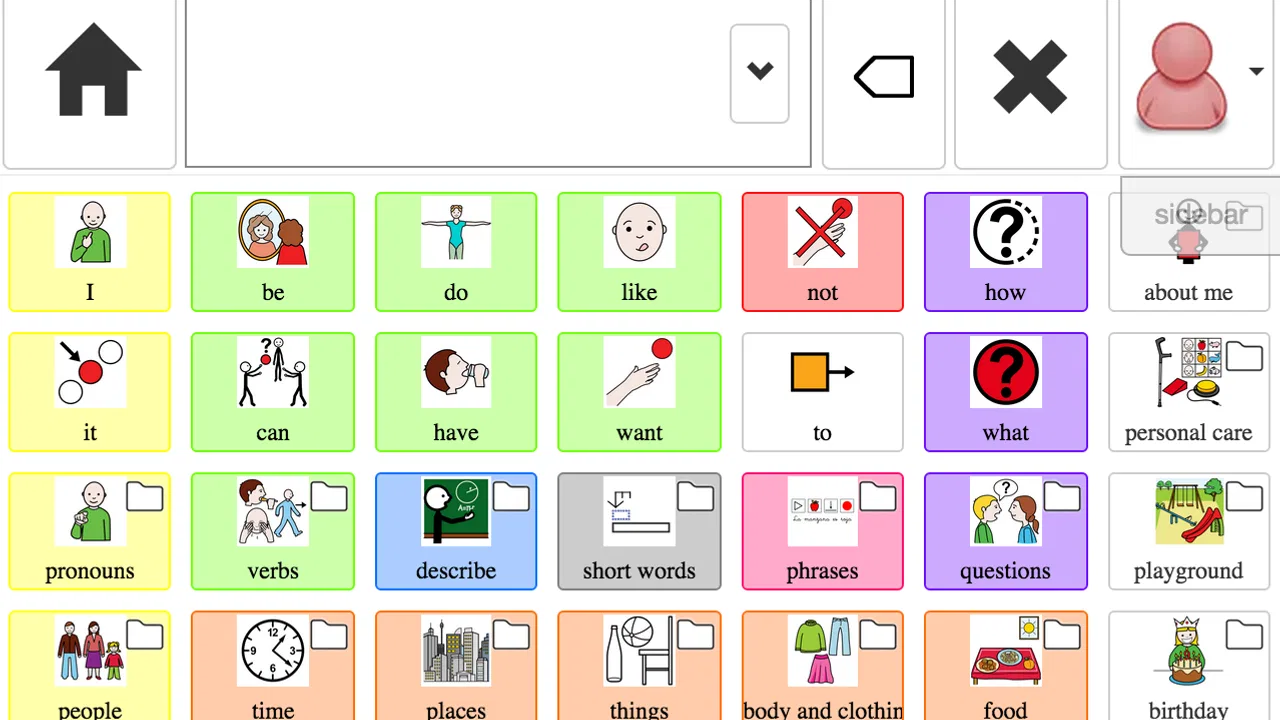
The basic workflow is straightforward: open the communication board, locate a word or phrase, select it, and use the resulting message to communicate. That sounds obvious, but the important detail is that the app is not merely a phrasebook. Its usefulness depends on how well the board reflects the communicator’s actual life. A board filled with unfamiliar vocabulary can be technically rich and practically slow, while a smaller, carefully arranged board can support faster and more confident exchanges.
You May Also Like

 Blood Strike: 2.5 Anniversary
Blood Strike’s Loadouts Turn Every Drop Into a Tactical Gamble
A close look at Blood Strike’s custom loadouts: how fast access to signature weapons reshapes its battle royale rhythm, rewards preparation, and narrows the gap between fights.

 Pandora - Music & Podcasts
Pandora’s Music Is Easy to Start, but Harder to Recover
Pandora’s strength is its low-effort path from a seed to a station. Its weak spot is how much confidence it asks you to place in connection, setup, and quiet recovery.

 8 Ball Pool
 Is Built on Rivalries, Rematches, and Routine
A close look at the rivalries, rematches, shared routines, and unanswered safety questions that turn a quick pool match into a persistent mobile community.

 Samsung Music
’s Quiet Strength Is Playing What You Already Own
Its reach comes less from spectacle than from dependable access to a personal library. That simplicity is both the app’s strongest retention engine and its ceiling.

 AccuWeather: Weather Radar
AccuWeather Review: A Quick, Clear Forecast for Everyday Decisions
For everyday plans, the best forecast is the one you can understand quickly. AccuWeather makes rain timing, radar, and local conditions easy to act on, with a few trade-offs.

 Hill Climb Racing
Why Hill Climb Racing Still Turns Crashes Into One More Run
A tiny car, a bumpy hill and one more upgrade: Hill Climb Racing keeps resurfacing because its simple chaos makes every near-miss feel personal.
More From Our News Desk
View All News


I would begin with a limited set of high-value words and situations rather than trying to prepare everything at once. Useful starting points might include requests, refusals, greetings, people, places, comfort needs, and words that help the user repair a misunderstanding. From there, the board can become more personal. A child may need school routines and favorite activities; an adult may need work-related language, healthcare vocabulary, and ways to discuss schedules or preferences.
One realistic scenario shows where the app can help. Imagine a parent and child leaving for an appointment. The child needs to communicate that they are uncomfortable, wants a particular item, and needs to answer a familiar question. If those words are placed where the child expects them, the device can support the conversation without forcing the parent to guess every need. The benefit is not simply producing speech; it is giving the communicator a repeatable way to initiate, reject, clarify, and participate.
That repeatability matters more than a large vocabulary count. I found it more useful to think in terms of communication paths: how does the user say “I want that,” “not that,” “help,” “wait,” or “I have something else to say”? These core paths should be easy to reach from several everyday contexts. If a person has to remember a complicated route for every basic request, the app becomes another barrier.
The application can also be useful when speech is available but unreliable, tiring, or difficult for unfamiliar listeners to understand. In that role, it is not necessarily replacing speech all day. It can act as a backup for noisy environments, emotional moments, phone conversations, or situations where the communicator wants more control over wording. That makes the app relevant to a wider group than people who never use spoken language.
Because the app is free, it is easier to explore without making an immediate financial commitment. That is valuable for families and support teams deciding whether a digital AAC approach fits their routine. At the same time, free access does not remove the work of choosing vocabulary, arranging boards, teaching navigation, and maintaining the device. The real investment is attention and consistency.
The current release is version 3.1.3, and the app supports devices running Android 7.0 or later. That makes compatibility worth checking before planning a dedicated device. On a supported phone or tablet, the screen size will influence the experience considerably. A small phone may be convenient to carry but cramped for a board with many choices. A larger tablet can make targets easier to see and select, though it may be less discreet or portable.
Build a dependable starting board
My advice is to observe communication before changing the layout. Write down what the person tries to say repeatedly, where breakdowns occur, and which words are currently being expressed through gestures, behavior, or partial speech. Those observations are more useful than copying a generic board and assuming it will fit.
Keep early changes deliberate. If every session introduces new buttons, it becomes difficult to tell whether the problem is vocabulary, placement, motor access, or simple unfamiliarity. A stable arrangement gives the user a chance to build memory. Once a location becomes familiar, changing it can slow communication even if the new organization looks cleaner to an adult.
I also recommend adding repair language early. Words such as “again,” “different,” “I don’t know,” “show me,” and “stop” often matter more in a difficult conversation than another category of nouns. These choices help the user control the interaction instead of only answering questions. That is one of the most important differences between an AAC board designed for real participation and one designed mainly to label objects.
Settings and preparation that deserve attention
The first settings I would review are those that affect access: how many choices appear, how large the targets are, and how much visual information is presented at once. A dense board may suit an experienced user with accurate motor control, while a simpler arrangement may be better during the learning stage or when fatigue affects selection. There is no universally correct level of complexity.
Check the device itself as well as the app. Screen brightness, orientation, touch responsiveness, sound level, and battery condition can all affect communication. A board that works at a quiet desk may be harder to use outdoors or in a busy classroom. I would test the device from the user’s normal position rather than only from the setup table, because viewing angle and reach can change what feels easy.
It is also worth deciding who is allowed to adjust the board. In a family or classroom, well-meaning people may add buttons whenever a new need appears. That can gradually produce clutter. A better habit is to keep a short change list, review it at a planned time, and make related edits together. This protects the user’s learned navigation while still allowing the system to grow.
Vocabulary should be checked for personal relevance and emotional safety. A communicator needs ways to express preferences, discomfort, privacy, and disagreement, not only requests that make routines convenient for caregivers. I would specifically look for language that lets the person decline an activity, ask for a break, report pain, and identify a trusted person. These are practical safeguards, not optional extras.
Another useful preparation step is to involve the people who regularly communicate with the user. A teacher may notice classroom words that a parent never hears, while a therapist may identify access problems that are invisible during casual home use. The goal is not to let everyone redesign the board. It is to collect observations and keep the final arrangement consistent across settings.
There is a trade-off between customization and maintenance. The more tailored the board becomes, the more important it is that caregivers understand its structure. If only one person knows where everything is, the system can become fragile when that person is unavailable. I would keep a simple written description of major categories and the reason for important changes, so support does not depend entirely on memory.
Faster patterns for experienced users
After the basic board is stable, speed usually comes from habits rather than frantic tapping. I would practice the same high-frequency routes during calm moments: greeting someone, asking for help, rejecting an option, requesting a preferred activity, and ending an interaction. Repeating these paths helps the user and communication partners stop treating every exchange as a fresh search task.
One effective pattern is to separate “must reach quickly” language from topic-specific language. Core communication should remain easy to find, while less frequent words can live in more specialized areas. This prevents the home screen from becoming a crowded storage space. It also gives the user a predictable escape route when a conversation moves in an unexpected direction.
Another practical habit is to model without demanding imitation. A parent, teacher, or support worker can use the board while speaking naturally, showing how words combine and how the user can add a comment rather than only answer a question. This is especially helpful when the app is new, because it demonstrates that the device is a genuine communication channel rather than a test the user must pass.
Use short practice moments connected to real routines. During a snack, practice requesting, refusing, commenting, and asking for more. Before leaving home, practice “wait,” “where,” and “finished.” In a classroom, connect the board to actual lessons instead of treating AAC as a separate subject. These small repetitions make navigation meaningful and reduce the pressure of formal drills.
I would also avoid changing the board immediately after a slow interaction. First ask what caused the delay. Was the word missing? Was the target too small? Did the user know the route but need more time? Did the communication partner interrupt? Each cause needs a different response. Removing useful vocabulary because a conversation was slow can make the system less capable without solving the real problem.
Communication partners can improve speed by changing their own behavior. Ask one question at a time, allow enough waiting time, and avoid repeatedly guessing. When a person is forced to reject a series of guesses, the app may appear inefficient even though the real issue is the conversation style. CoughDrop AAC works best when the surrounding people treat the communicator as an active participant.
Where flexibility reaches its limits
The main limitation is that flexibility creates responsibility. A blank or poorly organized board will not automatically become useful simply because the app can be customized. Families without AAC experience may need guidance from a speech-language professional or another knowledgeable support person. The app can be part of a communication plan, but it should not be mistaken for the entire plan.
There is also a difference between having access to words and having reliable access to communication. A person with visual, motor, cognitive, or attention-related needs may require careful observation and repeated adjustment. If selecting small targets is difficult, adding more choices will not fix the problem. If the user loses track of categories, a deeper structure may increase frustration. The right setup depends on the individual, and trial-and-error should be patient rather than constant.
I would be cautious about relying on a personal phone as the only communication method. Phones are easy to carry, but they can be misplaced, locked, low on battery, or distracting in ways a dedicated device may not be. A tablet may offer a better working surface, while a dedicated AAC solution may be preferable for users who need specialized access hardware or a more controlled environment. CoughDrop is a strong option to explore, not automatically the best answer for every access need.
It may also be the wrong choice for someone who wants a ready-made, almost maintenance-free phrase system. The app’s appeal is its adaptability, and that same quality can feel like work. If a user needs only occasional translated phrases or a very small set of emergency messages, a simpler communication tool may be faster to deploy. Conversely, if the person needs a personalized system that can evolve, a rigid phrasebook may become limiting.
Support teams should think about consistency across devices and caregivers. A communication system becomes less dependable when one person changes labels, another rearranges locations, and a third teaches a different route. Before making the app central to daily communication, agree on who manages edits, how new vocabulary is introduced, and how everyone will respond when the user communicates something unexpected.
The app’s average rating is 3.9 from around 177 ratings, with about 50 written reviews, and it has passed 50 thousand installs. Those figures suggest that it has reached a meaningful group of users while also reminding me not to treat it as a universal solution. AAC experiences vary sharply because the person, device, support network, and setup all matter. A rating can indicate general reception, but it cannot replace a hands-on trial with the intended communicator.
Who should try it, and who should look elsewhere?
I would recommend trying CoughDrop AAC if you want a free starting point for a personalized communication system, especially when a parent, educator, or therapist is prepared to spend time shaping the vocabulary and teaching the routine. It is also worth considering as a backup communication method for someone whose spoken communication becomes unreliable in particular situations.
It is a better fit for people who value gradual customization than for people who want an instant, finished experience. The app can support a child growing into new interests, an adult adapting communication for work or healthcare, or a family building a consistent way to handle daily requests and unexpected problems. Its education category is appropriate, but its usefulness extends into home, community, and support settings.
I would look for another option first if the user needs specialized physical access equipment, advanced clinical support, or a very tightly managed dedicated system. I would also hesitate if nobody has time to maintain the board. An AAC app that is technically available but poorly modeled, inconsistently updated, or difficult for partners to support can create disappointment for everyone involved.
Before committing to it in an important setting, test a normal day rather than a short demonstration. Try it during a meal, while moving between rooms, in a noisy place, and when the user is tired. Confirm that the device can be reached, seen, heard if speech output is being used, and protected from ordinary interruptions. Most importantly, watch whether the person can express something unexpected, not just select a prepared answer.
My verdict after building a repeatable routine
What I like about CoughDrop AAC is the balance between a low financial barrier and the possibility of creating something personal. It does not ask every communicator to use the same fixed set of phrases. With thoughtful setup, it can become a familiar map of the person’s needs, preferences, relationships, and daily environments. The strongest results come when the board is treated as a living communication system rather than a collection of buttons.
My biggest caution is equally clear: customization is not the same as simplicity. The first installation is only the beginning. You need to observe, edit carefully, practice during real routines, and make sure communication partners know how to support the user without taking over. Those habits determine whether the app feels empowering or frustrating.
For a free AAC app that runs on Android 7.0 and later, I think CoughDrop AAC deserves a serious trial from families and support teams who are willing to build a dependable workflow. I would start small, protect stable button locations, add repair and self-advocacy language early, and review changes with the actual communicator at the center. If you follow that approach, the app can become more than a backup for requests: it can give someone a practical, repeatable way to take part in everyday conversations.
FAQs for CoughDrop AAC
01What is CoughDrop AAC and who is it designed for?
CoughDrop AAC is an augmentative and alternative communication app designed to help people who have difficulty speaking communicate through symbols, text, pictures, and synthesized speech. It can be used by children and adults with autism, apraxia, cerebral palsy, stroke-related communication difficulties, or other conditions. Families, teachers, speech-language pathologists, and caregivers can also participate in communication planning and support.
02Does CoughDrop AAC work without an internet connection?
CoughDrop AAC can generally be used for communication when the device is offline, which is important when traveling or in places with unreliable connectivity. However, internet access may be required for account synchronization, cloud backups, updates, sharing boards, and remote support features. Before relying on offline use, it is sensible to open the communication boards while connected and confirm that the required content is available locally.
03Can I customize communication boards in CoughDrop AAC?
Yes. One of CoughDrop AAC’s main strengths is its flexibility. Users or communication partners can create, edit, and organize boards, change vocabulary layouts, add personal photographs, adjust button labels, and tailor content to a person’s age, abilities, routines, and interests. Customization may take time initially, especially for beginners, but it allows the app to grow with the communicator instead of forcing everyone into the same vocabulary system.
04Does CoughDrop AAC support caregivers, teachers, and speech therapists?
CoughDrop AAC includes collaboration-oriented features intended for communication teams rather than only the primary device user. Parents, teachers, therapists, and caregivers may be able to share boards, review communication activity, and make coordinated changes, depending on the account setup and current service options. These tools can make support more consistent across home, school, and therapy, although every team member should receive basic training before changing important vocabulary.
05Is CoughDrop AAC free to download and use?
The availability of CoughDrop AAC, its subscription requirements, and the features included at no cost can vary by platform, account type, and current pricing policy. Some functions may be available for testing, while advanced tools, cloud services, collaboration, or continued access may require payment. Check the Google Play Store or Apple App Store listing before downloading, and review subscription terms carefully so you understand renewal conditions and any limitations.
Pros
- Supports personalized AAC communication boards and vocabulary layouts.
- Works across Android
- iOS
- and web for easier device flexibility.
- Offers symbol-based and text-based communication options.
- Includes user profiles for caregivers
- therapists
- and communication partners.
- Cloud syncing helps keep boards and settings available across devices.
Cons
- Many advanced features require a paid subscription.
- The interface may feel complex for first-time AAC users.
- Reliable internet access is needed for some cloud-based functions.
- Board customization can take considerable setup time.
- Some users may need training to use the full feature set.

CoughDrop AAC
Gallery